 Klimkit is my open-source operator repo for keeping an agent-ready machine reproducible.
I built Klimkit because serious AI engineering work does not stop at prompts. Once you have multiple agents, worktrees, browsers, terminals, services, reports, notifications, and machine-specific settings involved, the hard problem becomes operational control: can a fresh VM become the same trusted workbench, can five or more agents run in parallel without stepping on each other, and can the final state be proven instead of merely claimed?
Klimkit is my answer to that. It is an open-source operator repo and local toolchain that keeps an agent-ready machine reproducible: Codex harness instructions, subagents, skills, hooks, code-server settings, Switchboard workspaces, Tailscale Serve routes, proof reports, notifications, and machine-local config are all managed from one source of truth.
This is not shelfware for me. I use Klimkit every day, across all of my projects, to keep the same baseline setup synced across machines and to move between parallel work running on different machines without losing the operating context. I also know of at least one company that has forked or adopted Klimkit internally for its own needs and shared positive feedback back with me; I treat that as early signal, not as a broad adoption claim.
Open Source Operator Infrastructure
Klimkit is not a SaaS wrapper. It is the local control plane I use to run trusted AI engineering environments across my own machines and private tailnet.
Challenge
Most agent setups are easy to demo and hard to operate. The fragile parts live outside the repo: ~/.codex instructions, code-server settings, local services, Tailscale exposure, task notes, browser tabs, notification hooks, and the working convention for when an agent is actually allowed to call something done.
That becomes painful when the workload grows past one terminal. If I want 5-7 agents running across separate branches, worktrees, and machines, I need fast switching, clear state, repeatable machine setup, and proof artifacts that survive the session. Otherwise, parallelism just creates noise.
What I Built
Klimkit packages that working environment into a Python CLI and source-controlled machine kit. The kk command can set up the local config, preview exactly what it would change, apply managed projections, diagnose the machine, serve Switchboard, pull updates, capture a code-server profile, and migrate .klimkit project artifacts between solo and team workflows.
The design is deliberately local-first:
- one human-edited TOML config under the Klimkit checkout
- ignored local state, backups, logs, and tokens under
.klimkit/local/,.klimkit/state/,.klimkit/backups/, and.klimkit/logs/ - source-controlled harness packs under
packs/codex/ - generated projections into
~/.codex, code-server, launchd, systemd, and Tailscale Serve paths - a manifest so later applies can back up, update, prune, or uninstall only what Klimkit owns
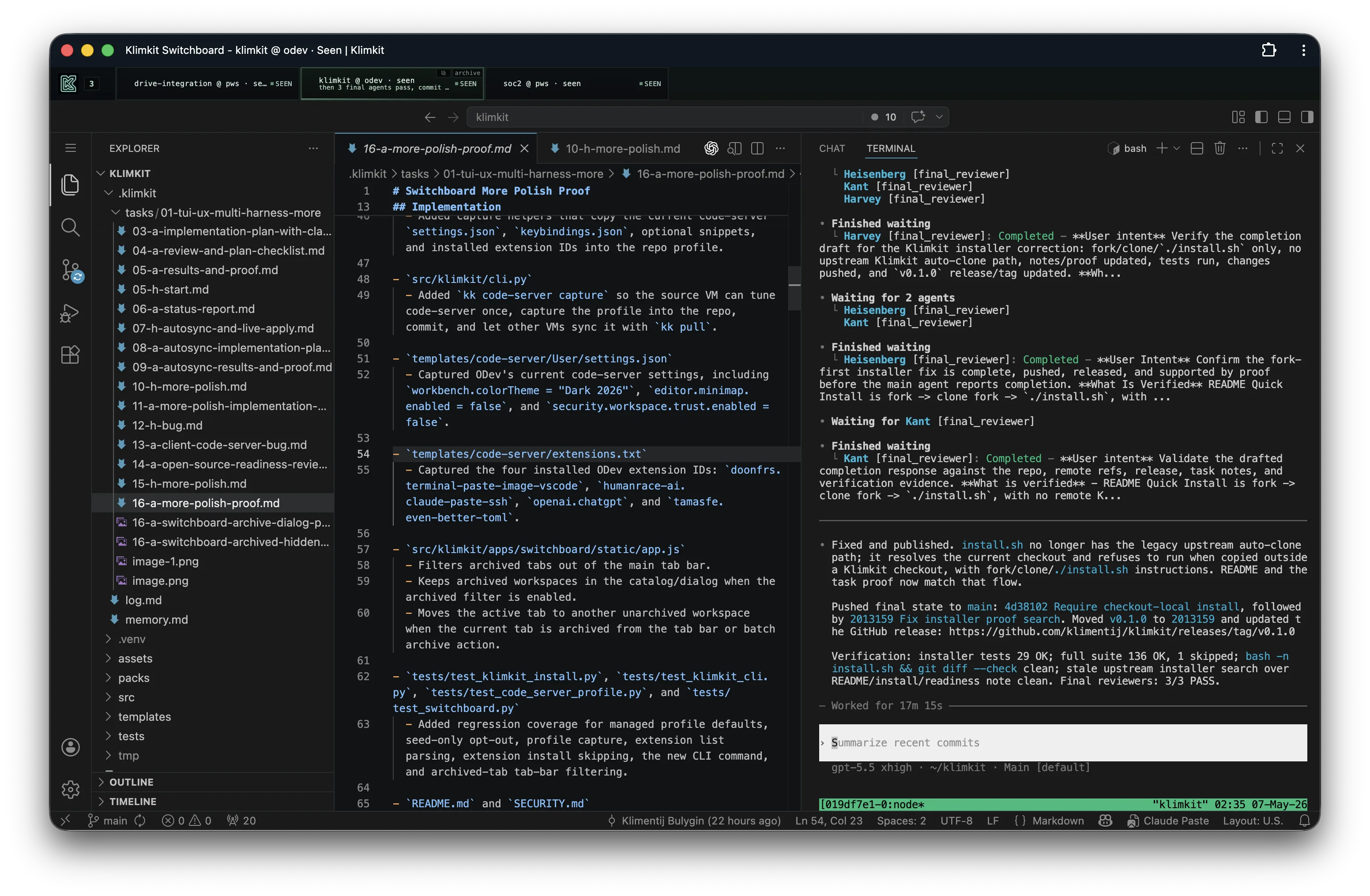 Switchboard running as a Chrome PWA: tabs represent active workspaces, while the main pane keeps code-server and Codex close together.
Switchboard
The visible part is Switchboard: a local web dashboard for Codex/code-server workspaces. It is built with vanilla HTML, CSS, and JavaScript, backed by a Python stdlib HTTP server and SQLite state. It keeps hot workspace tabs available, opens code-server for the selected machine and folder, and lets me jump between branches and worktrees without hunting through terminals.
Switchboard is also where the repo’s philosophy shows up in the UI. Workspaces have states, archive controls, machine and folder metadata, and catalog filtering. It is meant for repeated daily use, not a one-off demo. In practice, I use the same Switchboard app as the operational surface for multiple tabs across different machines, so I can keep separate agent sessions, branches, and worktrees visible without turning the workflow into a terminal scavenger hunt.
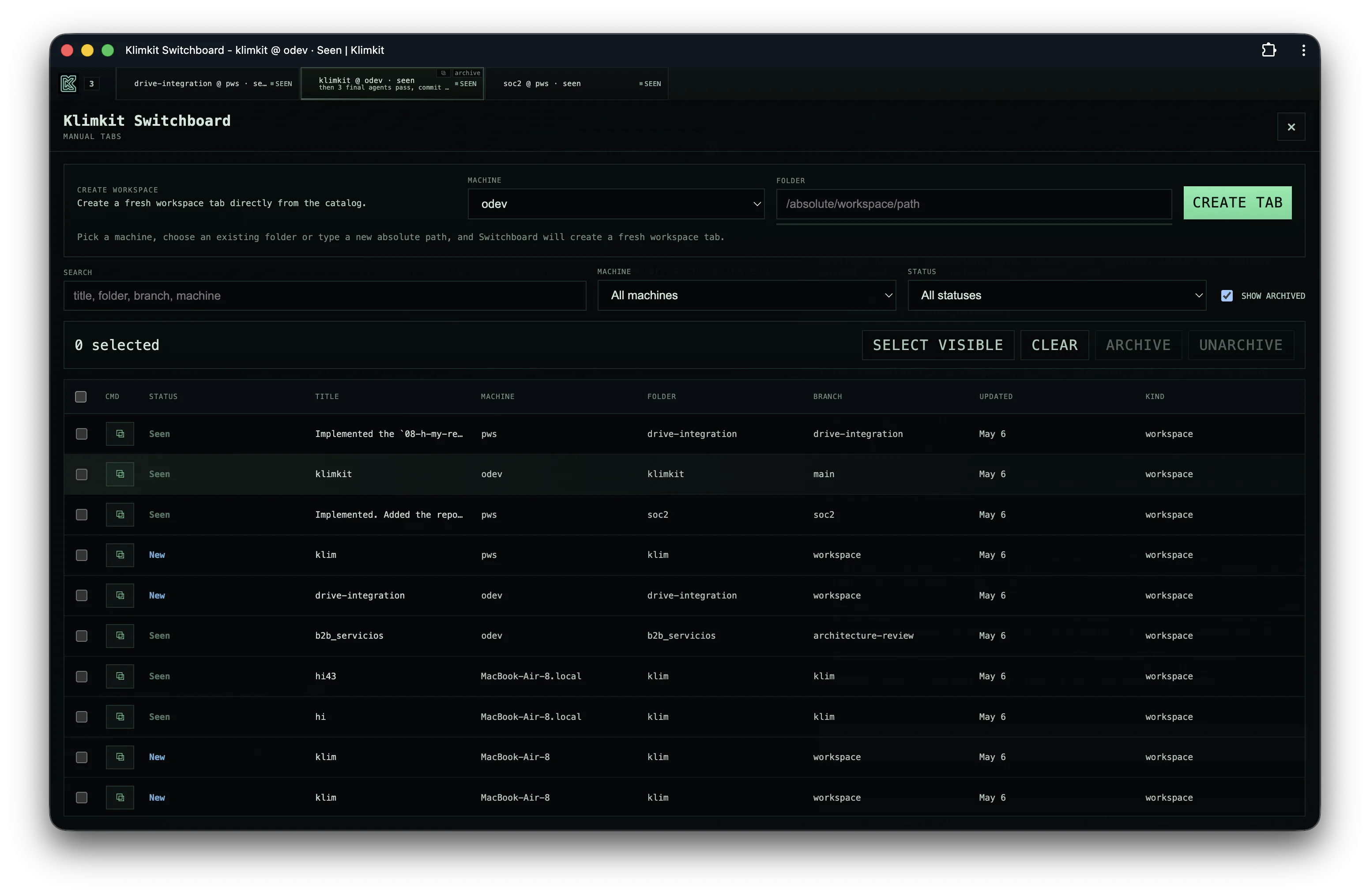 The Switchboard catalog is the operational view: create workspace tabs, filter by machine/status, manage archived work, and keep parallel agent sessions findable.
Codex Harness
Klimkit also manages the Codex harness itself. The shared pack projects:
AGENTS.mdworkflow rules- model and sandbox config
- stop hooks
- reusable skills
- named subagents for checklists, exploration, tests, debugging, security review, reflection, and final review
That sounds process-heavy, but the goal is practical: an agent should not claim completion because a build happened to pass once. Implementation work starts with a blocking checklist, UI work needs browser proof, non-trivial work gets a reflection pass, and completion claims go through three final reviewers. Klimkit makes that workflow reproducible across machines instead of relying on memory.
Why It Matters
This project is partly infrastructure and partly a statement of how I like building with AI: agents can be powerful, but only when the surrounding system is explicit, inspectable, and biased toward proof. Klimkit lets me move faster because the control surface is boring in the right places: config is local, generated files are owned, workspaces are visible, reports are kept in the repo, and machine sync is handled by Git plus kk pull or daemon autosync.
It also gives me a place to harden the meta-work. The same repo contains the harness, Switchboard, code-server profile capture, Tailscale report serving, Telegram notifications, and .klimkit evidence conventions. When a workflow rule proves useful, I can promote it into the pack and project it everywhere.
Security Boundary
Klimkit is for trusted personal machines, dedicated VMs, and private tailnets. It is not designed for arbitrary public exposure, and the default Codex pack is intentionally tuned for trusted local automation. Switchboard can run tokenless only on loopback, non-loopback access requires an auth token, and Tailscale Serve is the intended remote access boundary.
That boundary matters. A machine that runs AI agents with broad file access should be least-privileged, purpose-built, and kept away from unrelated secrets or production credentials.
My Role
I built the system end-to-end: CLI, installer, config model, projection engine, service integration, Switchboard UI/backend, worktree workflow, code-server profile sync, report serving, Telegram notifications, Codex harness pack, tests, and documentation.
The interesting part is not any single feature. It is the whole operating loop: source-controlled machine setup, visible parallel work, explicit evidence, and a disciplined completion workflow.